The floor
Phone-first. PIN in, pick a table, take the order. Merge two tables and the tab merges with them.
Waiter
Dine Track is restaurant POS and management software, built in Nepal. It runs the floor, the kitchen and the books on one system: waiters take orders on a handheld, the kitchen sees them the moment they are confirmed, and the bill adds up to the paisa.
No card, and nothing to install.
Built so nobody has to work out what something means in the middle of service. These are the real screens, from a demo restaurant.
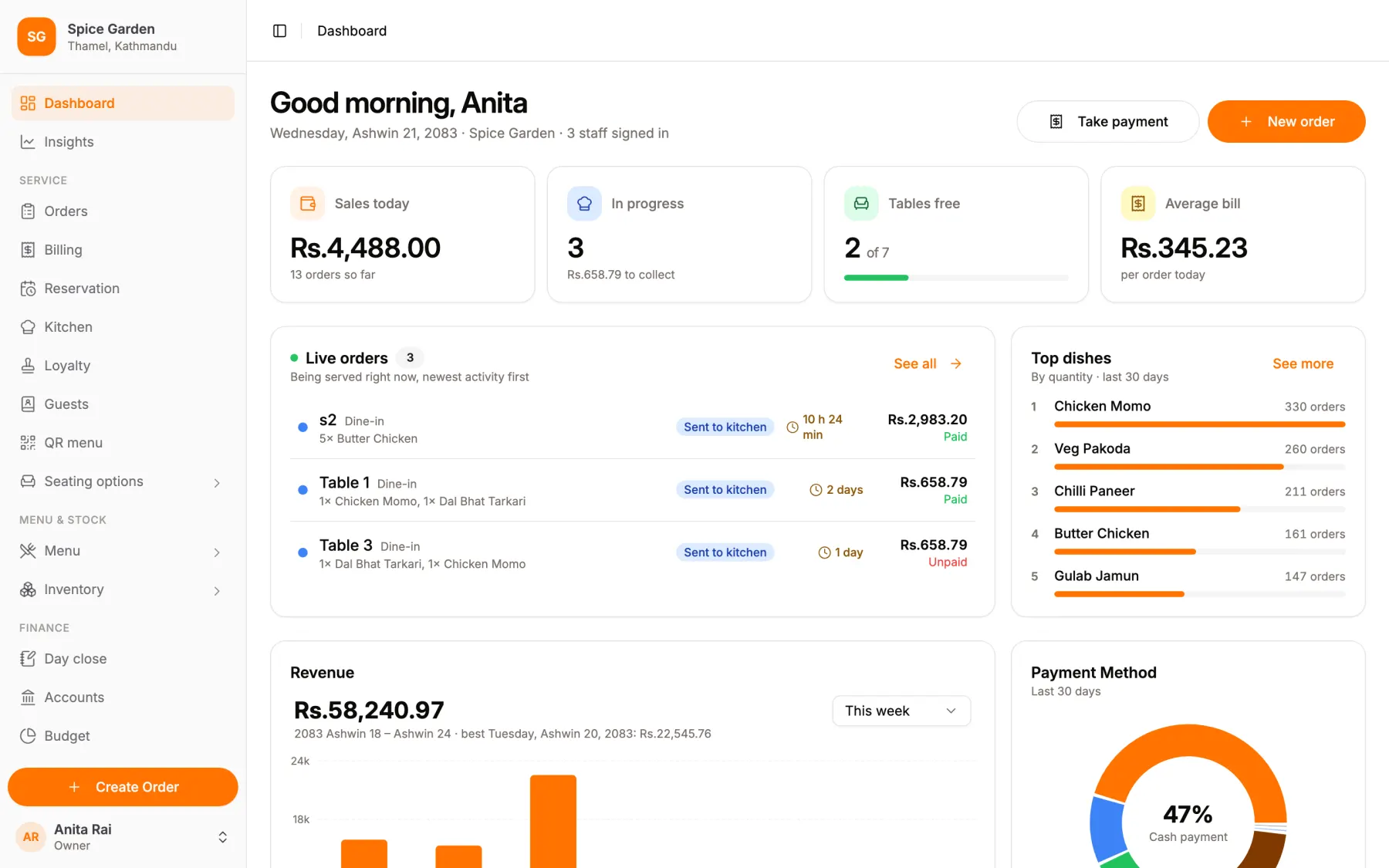
Sales so far, what is in progress, tables free and the average bill, with every live order one tap away.
A waiter’s phone, a chef’s board and an owner’s back office are not the same screen made smaller. Each role signs in and lands exactly where its work is.
Phone-first. PIN in, pick a table, take the order. Merge two tables and the tab merges with them.
Waiter
A full-screen board for each kitchen or bar station: To do, In progress, Completed. Tickets land, with a chime, the moment the floor confirms them.
Chef
Menu, seating, orders, billing, staff, payroll, stock and the day’s takings, with each role seeing only its own.
Owner · Manager · Cashier
80mm kitchen tickets and customer receipts, straight to a thermal printer over ESC/POS.
The pass
Splitting a bill, taking a payment twice, losing a ticket. These are the places we spent the time.
A manager enrols the handheld once. After that the floor switches staff with a four-digit PIN, so no password gets passed around a busy room.
Confirming an order puts the ticket on the kitchen board over a websocket. No refresh, no polling, and a card sitting fifteen minutes turns red.
By item, into equal shares, or by custom amounts. Equal shares sum to exactly the total; the odd paisa is shown, not quietly dropped.
Each payment carries an idempotency key, so a flaky connection and three taps still take one payment. Voiding keeps the row and the reason.
Zones, tables and merges. A booking holds its tables the way an order does, and a party already seated outranks the booking.
In, out, and wastage as its own kind. A running total beside an append-only log, so a figure that looks wrong can be accounted for.
Dates read in the calendar your restaurant actually keeps: on the dashboard, in the reports, and on the bill.
Owner, manager, cashier, waiter, chef, bartender. The sidebar hides what a role cannot use, and the server refuses it even if someone types the URL.
Starter runs the floor, the kitchen and the bill. Essential and Premium add the back office most restaurants keep in a notebook and a spreadsheet.
Every bill, expense, delivery and payroll run posts to a proper ledger, so the accounts are ready when you are.
The part that tells you what to change: which dishes earn, which hours are quiet, and where the money went.
KOTs, bills and reports that follow the way restaurants, cafés and bars here already work: VAT and service charge on the bill, wallet payments on the books, and Bikram Sambat on every date.
Set 13% VAT and a 10% service charge once, or whatever your restaurant charges. Every bill carries both, and changing a rate never rewrites an old one.
Record each payment as cash, card, bank transfer or the wallet it came from, so the day’s takings show how the money arrived, not just how much.
Prices, bills and reports in Nepali rupees. Split a bill three ways and the shares add up to the exact total.
It runs in a browser on the phones and tablets you already have, so a café in Pokhara runs it the same as a restaurant in Kathmandu.
4
Surfaces, one login
Floor · kitchen · back office · print
5
Roles, each with its own view
Owner, manager, cashier, waiter, chef
3
Ways to split a bill
By item, equal shares, or custom amounts
0
Paisa lost to rounding
Shares add up to the exact total, every time
Four steps, and we do the first pass with you.
Categories, items and prices. Tax and service-charge rates are set once and stamped onto each order as it is confirmed, so changing them later never rewrites an old bill.
Zones and tables, laid out the way the room actually is. Merges, reservations and billing all work against the same plan.
A manager registers each tablet once. Staff then sign in by PIN all shift, and revoking a device takes effect on its very next request.
Orders reach the kitchen live, tickets print at the pass, bills split to the paisa, and the day’s takings land on the dashboard.
Starter runs service. Essential runs the whole restaurant. Premium tells you how it is doing. All three run on the tablets and phones you have.
For a small restaurant that needs to run service.
Rs.17,999/ year
About Rs. 1,500 a month, billed yearly.
Launch price Rs. 13,499 / year, for the first 30
You save Rs. 5,989 a year
Up to 15 tables, 5 staff logins, 2 devices and 1 floor area.
Run the whole restaurant and keep the books.
Rs.26,999/ year
About Rs. 2,250 a month, billed yearly.
Launch price Rs. 20,249 / year, for the first 30
You save Rs. 8,989 a year
Know where the money goes, and what each dish earns.
Rs.44,999/ year
About Rs. 3,750 a month, billed yearly.
You save Rs. 14,989 a year
Fixed price. Offers and promo codes do not apply.
Prices in Nepali rupees. After the trial a restaurant stays on the plan it picks, Starter unless it chooses another. Premium is the same price for everyone. The launch price is 25% off the list price of Starter or Essential for the first 30 restaurants to sign up, kept on every renewal while the restaurant stays on Starter or Essential. A late payment gets a seven-day grace period before the account goes read-only.
Dine Track is a web app, so any reasonably modern tablet, phone or laptop with a browser will run it: iPad, Android or otherwise. There is no proprietary terminal to buy and no hardware lock-in.
Not yet, and we would rather say so. The tab lives on the server from the moment a table is seated, which is why a dropped handheld loses nothing and two waiters opening the same table see the same order. The trade is that the floor needs the venue’s network. Offline queueing is on the roadmap. If your connection is unreliable, tell us before you sign up.
Most restaurants have their menu, floor plan and first handheld running inside an afternoon. We do the first pass with you rather than handing over a manual.
Both. Kitchen tickets and customer receipts print at 80mm over ESC/POS, and every date in the product is Bikram Sambat: dashboard, reports and bills alike.
Yes. You set your tax and service-charge rates once (for most restaurants in Nepal that is 13% VAT and a 10% service charge) and each order is stamped with the rates in force when it was confirmed. Changing a rate later never rewrites an old bill.
Yes. Each payment is recorded as cash, card, bank transfer or a digital wallet, and a wallet payment says which one: eSewa, Khalti or Fonepay. So the day’s takings show not just how much came in, but how.
Yes. A waiter sees seating and orders; a chef sees the kitchen board and nothing else; a cashier bills but cannot touch payroll. The navigation hides what a role cannot use, and the server refuses the request regardless of what anyone types into the address bar.
Starter runs service for a small restaurant: orders, the waiter app, kitchen and bar boards, billing, payments, numbered invoices, menu, basic stock and the day-close report, for up to 15 tables, 5 staff logins, 2 devices and one floor area. Essential lifts those limits and adds accounts with a year-end close, sales registers, payroll, suppliers, stock history and stock counts, reservations, delivery partners, guest profiles with reward rules, and the QR menu. Premium adds the part that tells you how it is going: insights, recipes and dish cost, purchase suggestions, profit after tax, menu engineering, budgets, and owner emails. Every new restaurant starts with 14 days of Premium, then stays on the plan it picks (Starter unless it chooses another).
Nothing abrupt. There is a seven-day grace period after the due date in which everything keeps working normally. After that the system goes read-only: your data and reports stay readable, you simply cannot take new orders until it is settled.
Dine Track is live. Tell us about your restaurant and we will set up your account with you, on your own menu if you like.